In order to be able to download a video from the UWW website, you need to:
- Have access to the video via the UWW+ login. If you cannot personally play it, you cannot download it.
- Fetch the master.m3u8 download link of the video, either manually or with the help of an extension.
- Download it using e.g. yt-dlp or the form above.
m3u8 File
To easily get the download link, install this Chrome extension. When watching a UWW video, go to the extension window and click on "Copy First". You can also get it via Inspect element, in the Network tab (if you don't know what I'm talking about, ignore it).
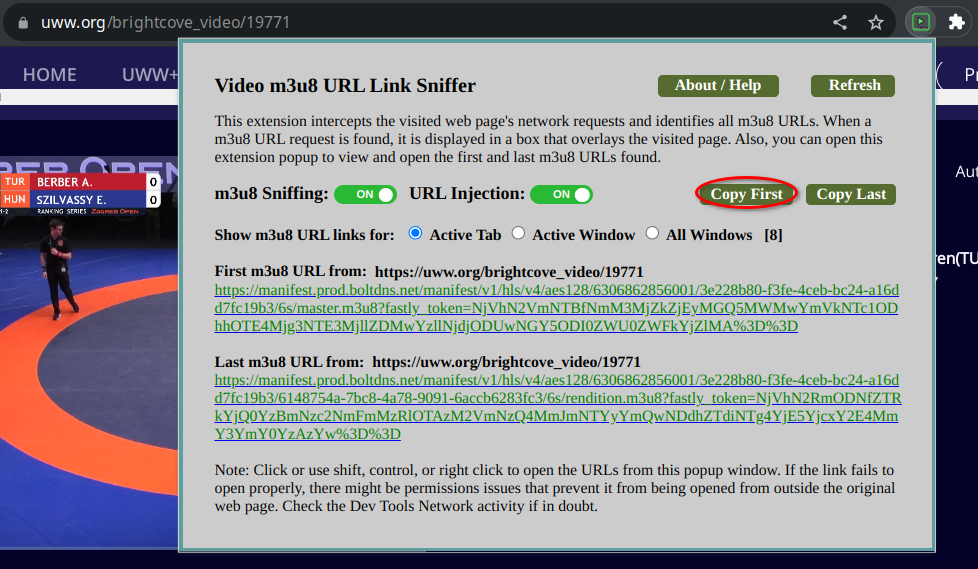
This automatically detects the master.m3u8 file, which is the playlist that contains the video. This is the link you will then use either with yt-dlp or my form.
Downloader
Use yt-dlp to download the file, using the following command:
yt-dlp -f bestvideo+bestaudio "the_link_you_just_copied_here"
Alternatively, fill the form above. The files will then be available until 3:00 in the morning on the following day on my server. If you'd like to download the whole video, leave the "Time from/to" fields blank.